
Field report
Calculating hours should not become extra work.
Power Tracker was built for people who bill by the hour. You already did the job once on site. You should not have to rebuild it later just to turn hours, breaks, rates, and notes into an invoice.

Use it on the next job you would normally track in notes.


Available for iPhone and Android.
The old way
The job is finished. The math is not.
The problem rarely looks dramatic while it is happening. A start time goes into Notes. A lunch break gets pushed to later. A client asks for one more thing before you leave. The rate is in one place, the hours are in another, and the invoice is still a blank page.
Then invoice day arrives and the real work has to be rebuilt: dates, regular time, overtime, breaks, notes, totals, payment instructions, and a PDF clean enough to send to a client. That is not organization. That is unpaid admin after the paid work is already done.
Why it exists
Power Tracker keeps the clock, the math, and the invoice together.
I built Power Tracker around one practical loop: client, clock-in, hourly rate, notes, weekly review, invoice. Not a back-office system. Not accounting software pretending to be simple. Just the path an hourly worker has to walk every time finished work needs to become a bill a client can understand.
The important part is that the calculation is not a separate chore. If the hours were tracked with the right client, rate, breaks, and notes, invoice day becomes a review instead of a reconstruction.
Track once. Let the totals follow. Build the invoice from the same record.
How it works
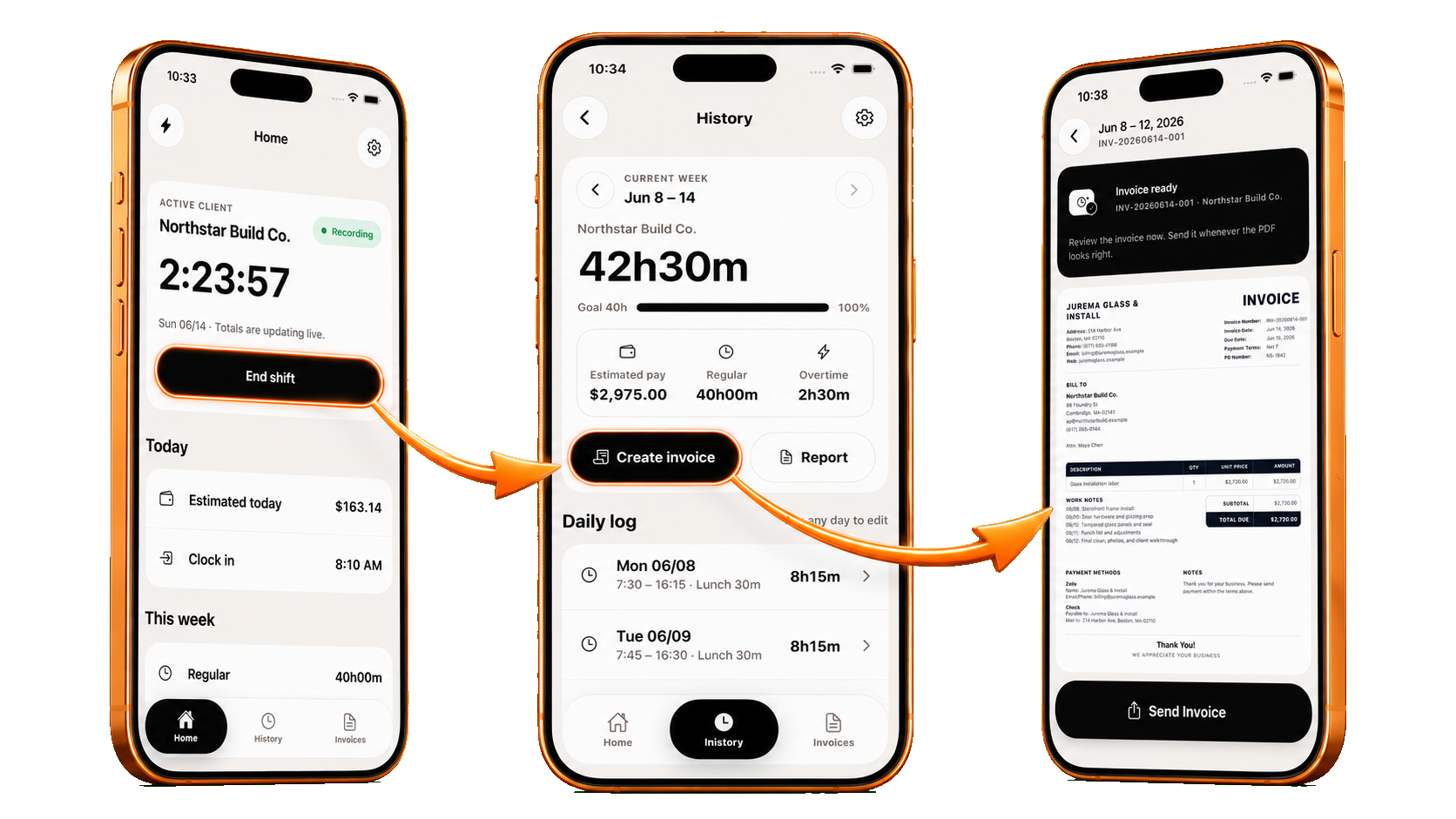
Clock in, check the week, make the invoice.
The app is built to reduce the number of places your week can get lost. Each step is intentionally plain because the workflow has to work after a long day, when admin is the last thing you want to do.
-
01
Clock in with the right client and rate.
Start the timer when the job starts, keep the rate attached, and add the kind of note you would otherwise trust yourself to remember later.
-
02
Let the week add itself up.
Review daily logs, lunch, regular time, overtime, weekly totals, and estimated pay while everything is still close enough to correct.
-
03
Create the invoice from tracked time.
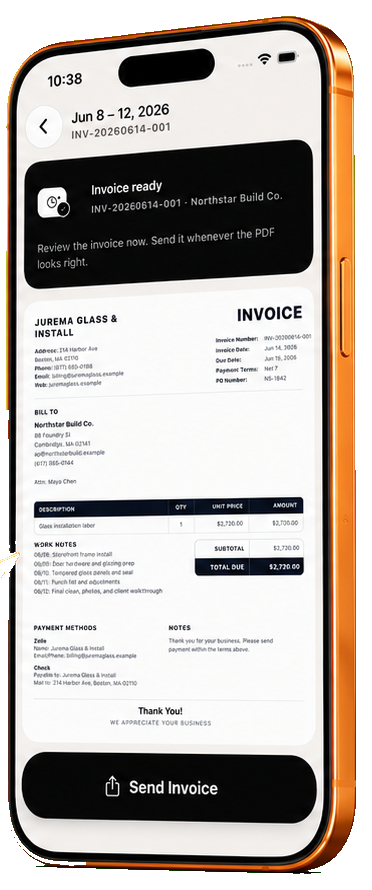
Build a PDF invoice with client details, line items, work notes, payment instructions, and a sent or paid status you can come back to later.
What changes
Less cleanup after the job. A clearer invoice before you send.
Power Tracker is not trying to run your whole business. It focuses on the part that steals time every week: getting from hours worked to a professional invoice without a separate timer, spreadsheet, notes app, and document editor.
No Sunday spreadsheet
The week is already arranged by client, shift, notes, breaks, and totals.
The rate stays attached
Hours are tracked with the client and rate, so the math has less room to drift.
Cleaner client proof
Work notes and invoice lines stay connected, which makes the bill easier to explain.
Made for the phone
Use it at the job site, in the truck, or before the details disappear at home.
Try it on a real week
Try it before the next invoice gets messy.
Download Power Tracker, set up one client and rate, then use it for the next job you would normally track in Notes, Google Keep, paper, or a spreadsheet.
Power Tracker Pro gives you full access. The current in-app paywall lists a monthly plan with 7 days free, then $14.99/month, and a weekly plan at $4.99/week. Purchases, renewals, and cancellations are handled by the App Store or Google Play account you use to subscribe.
FAQ
Questions before you download
Who is Power Tracker for?
Contractors, cleaners, handymen, field service pros, tutors, consultants, freelancers, and independent workers who bill by the hour and want the weekly math to lead directly into an invoice.
Does it replace QuickBooks or accounting software?
No. Power Tracker is focused on the path from tracked time to invoice preparation. It is not payroll software, accounting software, or tax advice.
Can it create a PDF invoice?
Yes. After you review the week, Power Tracker can create an invoice with client details, work notes, hours, rates, totals, and payment instructions.
Can I track overtime, breaks, and different clients?
Yes. The app supports client-specific tracking, weekly review, regular time, overtime, lunch and break adjustments, notes, and invoice status.
Does it collect payment for me?
Power Tracker helps you prepare and send the invoice, include payment instructions, and mark invoices as draft, sent, or paid. It is not a payment processor.
Download Power Tracker
Your next invoice should already have the hours behind it.
Track the work while it is fresh. Review the totals. Create the invoice from the same record.